../
Removing
Creating a
Myriad
Myriad
Myriad is small search engine capable of performing Entity Retrieval. Myriad is a play on words like Google (which is derived from googol $10^{100}$). Myriad in greek means 10,000 which is roughly the cardinality of our entities.
- Deployed at https://myriad.deebakkarthi.com
- Frontend code https://github.com/deebakkarthi/myriadclient
- Backend code https://github.com/deebakkarthi/myriadserver
Dataset
The dataset used here is the Wikipedia Bullet Points Dataset
Preprocessing
- Each datapoint is an
Objectwith two keys. We are going to ignore theyearfield{'fact': 'Roman Empire. <a href="[https://en.wikipedia.org/wiki/Dacia](https://en.wikipedia.org/wiki/Dacia)">Dacia</a> is invaded by barbarians.', 'year': '166'} - There are 40356 facts
Removing <a></a> tags
- Though this will be useful later, for building our tf-idf matrix these are futile. Hence we will remove these.
- To make our lives easier this can be done in a line using
BeautifulSoup.findAll(strings=True). This returns essentially the rendered HTML text.- I didn’t have the time nor the patience to write my own HTML parser to do this. I tried some regex magic but feared that there may be other tags and random corner cases.
TF-IDF
- Now that we have raw text, the next stage is to create a TF-IDF weight matrix
- Though I have my own implementation of this, I ended up just using
TfidfVectorizerfromsklearn.feature_extraction.textbecause it also performs all the necessary preprocessing and returns it in a sparse matrix form - We save both the vectorizer object and the weight matrix. This allows us to perform the same preprocessing when dealing with requests using the vectorizer object.
Information Retrieval
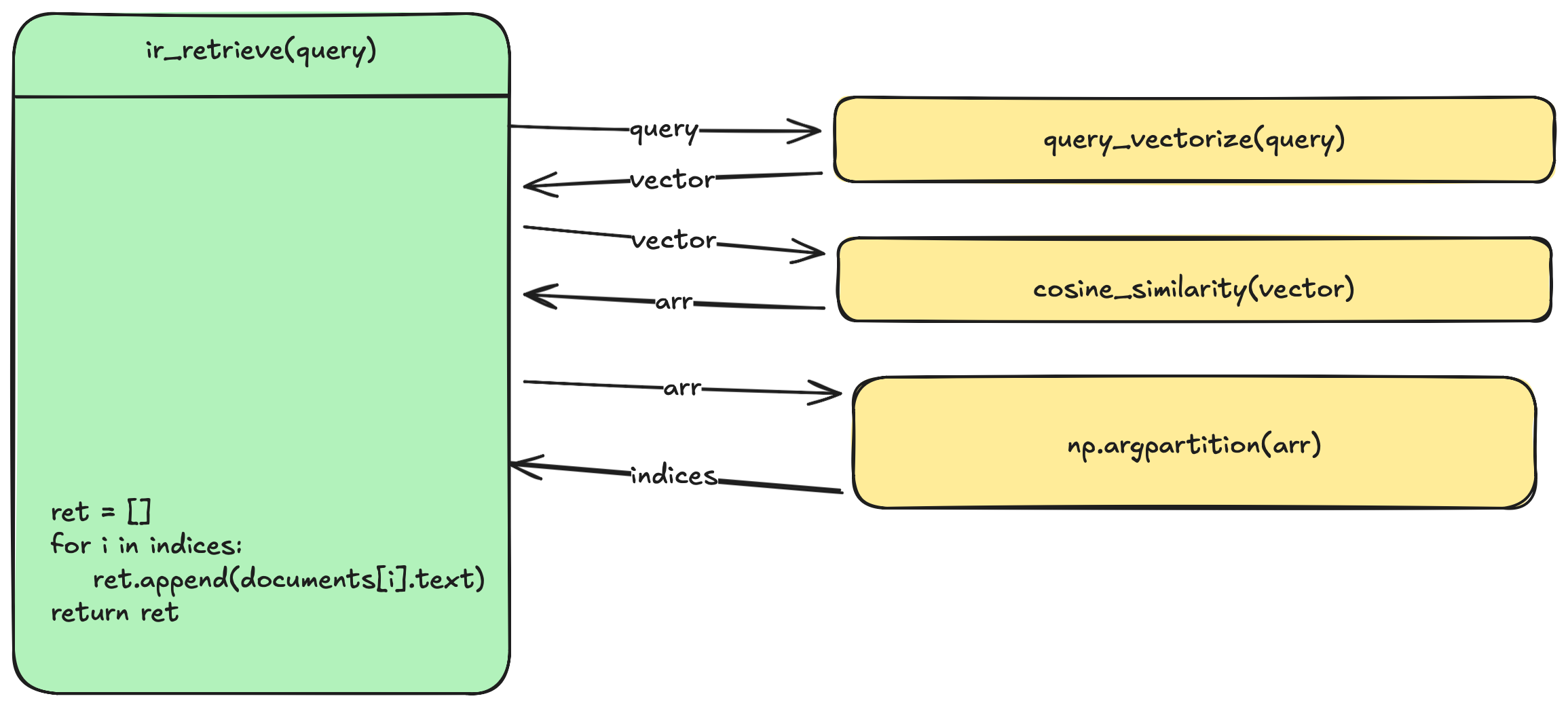
- This is the straightforward part of this project. Given a query $Q$ return the top 10 documents $D$
- We use Cosine Similarity to score each document
- Given below is a simplified call graph of this.
Entity Retrieval
- This is the hard part. Entity retrieval attempts to retrieve Named Entities from some database given a query
- As we can see below, when search for Thomas Jeffereson, Google created this Knowledge box. This is different from retrieving a document. Google recognized an entity from the query and generated this.
By Google - Google web search, CC BY-SA 3.0, https://commons.wikimedia.org/w/index.php?curid=37997885
- This involves a quite a bit of NLP and we are not going to perform that. We are going to use the API provided by https://sobigdata.d4science.org/web/tagme/wat-api
- Another neat little trick is to extract these entities from the dataset itself.
Implementation
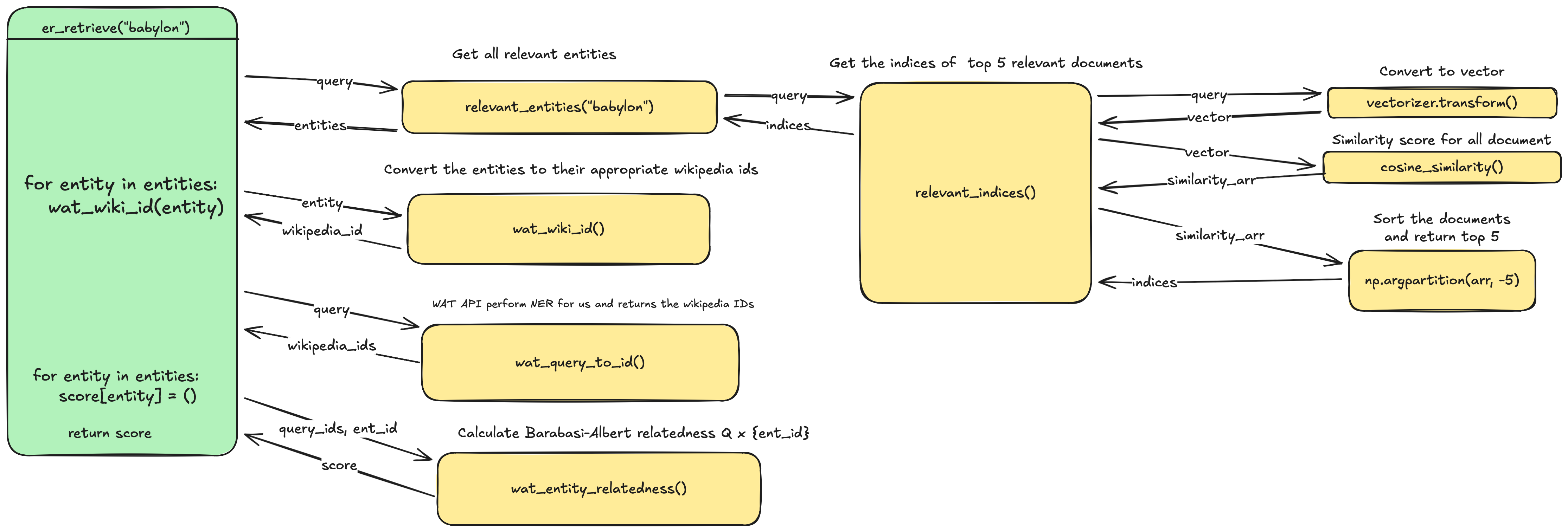
- The above image shows a rough version of the implementation
- Notice that we don’t have to perform NER on the documents. This is because we are just going to use the wikipedia links present in the documents as named entities.
- But we ask WAT to perform NER for the query
- I could cache the wikipedia ids for all the NERs in the documents but I am trying to run this on a VPS with 1GB of ram so every MB is precious to me. So performing this dynamically. This also prevents broken links.
Deployment
- First get SSL certificate using certbot. Refer this
- Use the following
nginxconfig
# Force https
server {
        listen 80;
        listen [::]:80;
        server_name myriad.deebakkarthi.com;
        return 301 https://myriad.deebakkarthi.com$request_uri;

}

# Actual server
server {
        listen 443 ssl http2;
        listen [::]:443 ssl http2;
        server_name myriad.deebakkarthi.com;
        ssl_certificate /etc/letsencrypt/live/myriad.deebakkarthi.com/fullchain.pem;
        ssl_certificate_key     /etc/letsencrypt/live/myriad.deebakkarthi.com/privkey.pem;
        root /var/www/myriadclient;
        index index.html;
        location / {
                try_files $uri $uri/ $uri.html;
        }
        location /api/ {
                proxy_set_header X-Forwarded-For $proxy_add_x_forwarded_for;
                proxy_set_header X-Forwarded-Proto $scheme;
                proxy_set_header X-Forwarded-Host $host;
                proxy_set_header X-Forwarded-Prefix "/api";
                proxy_pass http://localhost:8000/;
        }

}
- First we force
HTTPS - Notice the trailing
/after/api/and also afterproxy_pass http://localhost:8000/ - This strips
/apibefore sending the request to the backend. Additionally we include that stripped part as a headerX-Forwarded-Prefix - I like doing it this way because I can change the frontend endpoints without changing the backend
- Example if I am trying to port this backend to
C. I can have the endpoint/api/v1for the the old one and /api/v2for my new one- I can change them as I please without bother the backend
- Example if I am trying to port this backend to
Sanity checks
- Check if
http://myriad.deebakkarthi.comredirects tohttps://myriad.deebakkarthi.comcurl -I http://myriad.deebakkarthi.com
Creating a systemd unit to run myriadserver
[Unit]
Description= myriadserver
After=nginx.service
[Service]
User=myriad
Group=myriad
Type=simple
WorkingDirectory=/opt/myriadserver
ExecStart=/opt/myriadserver/serve.sh
[Install]
WantedBy=multi-user.target
- Create a dummy system user called
myriad - Place the src code in
/opt/myriadserver - make sure the user has permission
- Create a Python
venvthere and install the requirements
Create a small script to activate the environment
#!/usr/bin/env bash
set -e
source "/opt/myriadserver/venv/bin/activate"
gunicorn wsgi:app
deactivate
myriadclient
git clone https://github.com/deebakkarthi/myriadclient.gitand place it in the path given in yournginxconfig- TODO figure out some sort of packing or deployment script. Right now I am manually copying the files to avoid serving
.git